 Help
Topics Help
Topics
Help
Topics Help
Topics
Home | Portfolio | Contact | Help Topics
3/28/2005:
I just bought an Epson
RX620 all-in-one scanner/copier/printer. I previously bought a similar
model from HP that had a built-in 802.11g WiFi adapter, but returned it
because it would cut off the bottom of detailed images when printing wirelessly
(if you know of this problem with HP printers and have anything interesting
to add, please contact
me and I'll be happy 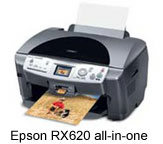 to
post your comments on my site). My previous printer, an HP Deskjet 970Cxi did
the same thing when printing through my AirPort Extreme base station, so perhaps
it's a problem with HP's PCL drivers, since the problem occurs with both HP
printers when printing via both the internal wireless adapter and the AirPort
Extreme???
to
post your comments on my site). My previous printer, an HP Deskjet 970Cxi did
the same thing when printing through my AirPort Extreme base station, so perhaps
it's a problem with HP's PCL drivers, since the problem occurs with both HP
printers when printing via both the internal wireless adapter and the AirPort
Extreme???
 So
here's the interesting part of the story: Epson sells an optional
Bluetooth adapter for some of their printers, the RX620 included (suggested
retail $69). This option appealed to me since my PowerBook
G4 laptop is equipped with Bluetooth. I also recently bought a Belkin
Bluetooth mouse to use with my PowerBook ($79.99
at CompUSA). The Belkin
Bluetooth mouse includes its own bluetooth host adapter, which I didn't
need since my PowerBook has an internal adapter. So I had this extra Bluetooth
adapter lying around, and I did what any other self-respecting geek would do
with it: I started plugging it into things.
So
here's the interesting part of the story: Epson sells an optional
Bluetooth adapter for some of their printers, the RX620 included (suggested
retail $69). This option appealed to me since my PowerBook
G4 laptop is equipped with Bluetooth. I also recently bought a Belkin
Bluetooth mouse to use with my PowerBook ($79.99
at CompUSA). The Belkin
Bluetooth mouse includes its own bluetooth host adapter, which I didn't
need since my PowerBook has an internal adapter. So I had this extra Bluetooth
adapter lying around, and I did what any other self-respecting geek would do
with it: I started plugging it into things.
I turned off my new printer, plugged in the Belkin Bluetooth adapter, then turned the printer back on again. Much to my satisfaction, the RX620 printer immediately recognized the Belkin Bluetooth adapter and allowed me to configure it via the printer's front panel. My PowerBook was then able to discover the RX620 via Bluetooth and away I went... Or so I thought.
At the last step of the installation, OS X tells me that the driver can't be found, or something similar. From what I've read online, this problem occurs with Epson's Bluetooth adapter as well. Apparently, Epson's OS X driver hasn't yet been updated to include Bluetooth support. So it looks like the Belkin Bluetooth adapter (and probably many others that use the same chipset) works just fine with Epson printers that have Bluetooth adapter support... We'll confirm this when/if Epson comes out with an OS X driver that supports it. I already have submitted a tech support inquiry and await Epson's reply.
 There's
no point in trying this on my Windows XP PC, since it's a desktop and I don't
have any use for Bluetooth connectivity on it; I'd also need to get another
Bluetooth adapter to try it. But if you have a PC that you want to try it with,
or if you're a Mac user who's figured out how to get this to work, please contact
me and I'll be happy to post your results here. Belkin also sells the Bluetooth
adapter separately - the "10 meter range" model - as well as a 100
meter range model (see
all Belkin Bluetooth products here).
There's
no point in trying this on my Windows XP PC, since it's a desktop and I don't
have any use for Bluetooth connectivity on it; I'd also need to get another
Bluetooth adapter to try it. But if you have a PC that you want to try it with,
or if you're a Mac user who's figured out how to get this to work, please contact
me and I'll be happy to post your results here. Belkin also sells the Bluetooth
adapter separately - the "10 meter range" model - as well as a 100
meter range model (see
all Belkin Bluetooth products here).
-Kevin
marintellect.com
Images courtesy of epson.com and belkin.com.
Comments (submit):
I just received this response back from Epson: Ashish P Now that really stinks. What I gather from this is that Epson has no intention of ever enabling printing, scanning or any of the RX620's other features via Bluetooth. What's the point? |
| From: bitnaut I think you misunderstand. You send your photos across bluetooth to the printer and it will print them. You don't use the print dialog to print with bluetooth. |
On May 23, 2005, at 2:17 PM, Tyler Wright wrote: Have you found a solution for the bluetooth problem described in one
of your postings? I just purchase the RX620 and I am having the same issue
- when using the boothtooth setup assistant, it tells me that some of
the software has not been installed - when I print, i just get garbled
junk. Thanks, Tyler Wright |
On May 23, 2005, at 10:56 PM, Kevin Pedersen wrote: Tyler, Apparently bluetooth is only for camera phones and stuff like that. There is no printer driver for it, nor will there be, according to Epson. Instead, I print wirelessly via an AirPort Extreme base station's USB port, which works great.* If I need the scanner, I plug into the RX620 directly. I've found that the USB cable can hang out the left side of the RX620, which makes it a lot easier to plug & unplug vs. with the USB cable routed through the back. This is not an ideal solution, but I scan so infrequently that it hasn't presented a problem. Let me know if you discover a more elegant solution. -Kevin *My wife's PC laptop (wireless), my PC desktop (LAN) & my PowerBook
G4 (wireless) all print via the AirPort base station to the Epson RX620.
If you need to set up a PC to print via AirPort, add a local printer,
new port, TCP/IP port at the address of the base station (e.g. 10.0.1.1),
but change the default port from 9100 to 9101. |
On May 24, 2005, at 2:17 PM, Tyler Wright wrote: Kevin, We have actually placed an order for the Airport Extreme as well so
it looks like we are on the same track - I called Epson as well and got
the same information you received. take care, Tyler |
| made | ||
|---|---|---|
| with | ||
| HTML | ||